> For the complete documentation index, see [llms.txt](https://docs.incari.com/incari-studio/llms.txt). Markdown versions of documentation pages are available by appending `.md` to page URLs; this page is available as [Markdown](https://docs.incari.com/incari-studio/2023.2/objects-and-types/scene-objects.md).
# Scene Objects
An **Object** in **Incari** is any entity which can be added to a **Scene**. "**Object**" is a broad term used to describe a number of different components, each with their own purpose, behaviors, and characteristics.
For in-depth descriptions of each type of **Object**, see the [**Table of Contents**](#contents) below.
## Managing Objects
**Objects** in a **Scene** are managed in the **Scene Outliner**. There they can be created, deleted, edited, and organized. For more detail, see the [**Scene Outliner**](/incari-studio/2023.2/modules/scene-outliner.md) section.

## Attributes
**Attributes** define specific characteristics of entities in **Incari** and can be modified in the [**Attribute Editor**](/incari-studio/2023.2/modules/attribute-editor.md). Particularly, there are several sets of **Attributes** that are shared throughout **Objects**. These are explained in detail in the [**Common Attributes**](/incari-studio/2023.2/objects-and-types/attributes/common-attributes.md) section:
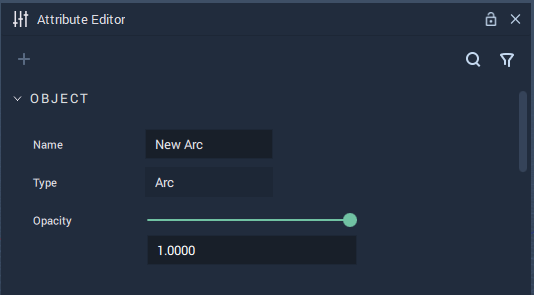
* [`Object`](/incari-studio/2023.2/objects-and-types/attributes/common-attributes/object.md): The `Name`, `Type`, and `Opacity` of an **Object** are shown here.
* [`Tag`](/incari-studio/2023.2/objects-and-types/attributes/common-attributes/tag.md): *Metadata* that serves as an identifier for an **Object** or several of them.
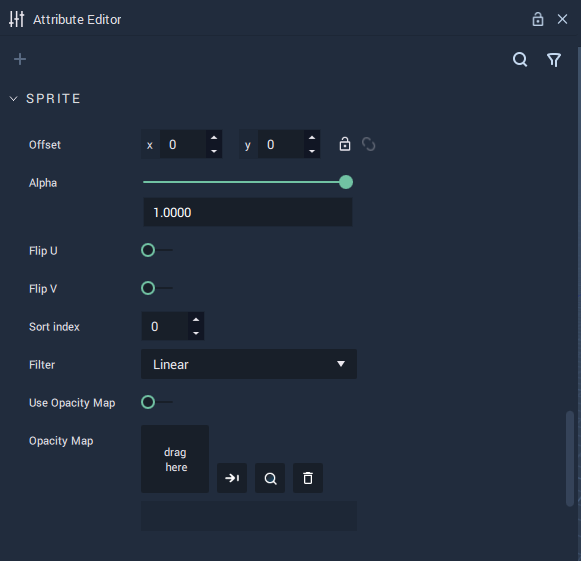
* [`Sprite`](/incari-studio/2023.2/objects-and-types/attributes/common-attributes/sprite.md): They determine how an **Object** is visualized in a **Scene**.
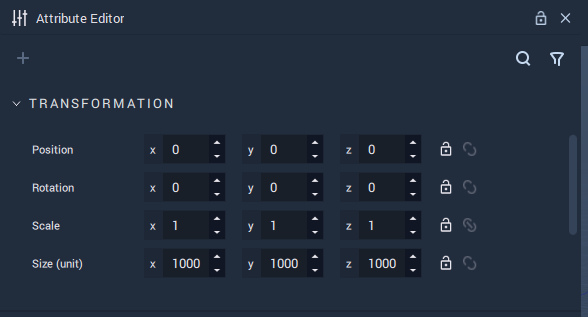
* [`Transformation`](/incari-studio/2023.2/objects-and-types/attributes/common-attributes/transformation.md): They define the *position* and *rotation* of an **Object** in a **Scene**.
Object Attributes.
Tag Attributes.
Sprite Attributes.
Transformation Attributes.
## Prefabs
**Prefabs** are an important and useful type of **Object**. They are composed of a combination of **Objects** and allow the user to create several **Instances** of this combination, enact changes across all of them, or apply individual characteristics via overrides. For more information, see the [**Prefabs**](/incari-studio/2023.2/objects-and-types/prefabs.md) section.

## Objects in Logic
In the [**Logic**](/incari-studio/2023.2/modules/logic-editor.md), it might be necessary to make references to specific **Objects**. For this, each **Object** in a **Scene** gets assigned an **Object ID**, which is a unique identifier. The **Object ID** of an **Object** can be obtained from said **Object's** **Node**, which is created by dragging an **Object** from the **Scene Outliner** to the **Logic Editor**.
For handling and modifying **Objects** in the **Logic**, there is a special category of [**Nodes**](/incari-studio/2023.2/modules/logic-editor.md#nodes): the [**Object Nodes**](/incari-studio/2023.2/toolbox/incari/object.md). These **Nodes** allow the user to obtain and set **Attribute** values for **Objects**, and they receive as input the **Object ID** of the target **Object**.

## Structure in a Scene
**Objects** in a **Scene** are organized in a *tree*. This means that every **Object** except for the [**Root Object**](#root-object) has a *parent* and all **Objects** may have *children*.
The picture below shows an example. Here, `Object1` is the *parent* of `Object4` and `Object5`, `Object2` is the *parent* of `Object6`, and `Object3` has no *children*.

### Root Object
Every **Scene** has a **Root Object**, which is the *parent* of all **Objects** that are on the first hierarchy level. Thus, all **Objects** in a **Scene** are *descendants* of the **Root Object**. To obtain the **Object ID** of the **Root Object**, use the [**Get Root** **Node**](/incari-studio/2023.2/toolbox/incari/object/get-root.md).
### Managing the Structure of Objects in a Scene
In the **Scene Outliner**, there are three ways to make an **Object** the child of another:
* Drag an existing **Object** and drop it on top of the **Object** that will be the *parent*.

* Select the **Object** that will be the *parent* and create a new **Object** by clicking the plus %20\(4\)%20\(4\)%20\(4\)%20\(4\)%20\(4\)%20\(4\)%20\(4\)%20\(1\)%20\(1\)%20\(1\)%20\(2\).PNG?alt=media) icon on the top left and selecting the **Object** to create as a *child*.

* Right-click the **Object** that will be the *parent*, click on `Create` on the drop-down menu that appears and select the **Object** to create as a *child*.

Moreover, **Objects** in the **Scene Outliner** can be dragged and dropped anywhere in the **Scene** structure, as can be seen in the following example:

### Nodes
There are a few **Nodes** that allow the user to obtain and use information about the structure of **Objects** in a **Scene**. These are:
* [**Get Children**](/incari-studio/2023.2/toolbox/incari/object/get-children.md): Returns the *children* of an **Object**.
* [**Get Parent**](/incari-studio/2023.2/toolbox/incari/object/get-parent.md): Returns the *parent* of an **Object**.
* [**Has Children**](/incari-studio/2023.2/toolbox/incari/object/has-children.md): Returns a **Boolean** indicating whether an **Object** has *children*.
For more information about *trees*, visit the [Tree (data structure)](https://en.wikipedia.org/wiki/Tree_\(data_structure\)) page on *Wikipedia*.
## Contents
* [**Audio**](/incari-studio/2023.2/objects-and-types/scene-objects/audio.md)
* [**Camera**](/incari-studio/2023.2/objects-and-types/scene-objects/camera.md)
* [**Group**](/incari-studio/2023.2/objects-and-types/scene-objects/group.md)
* [**Image Sequence Sprite**](/incari-studio/2023.2/objects-and-types/scene-objects/imagesequencesprite.md)
* [**Label**](/incari-studio/2023.2/objects-and-types/scene-objects/label.md)
* [**Light**](/incari-studio/2023.2/objects-and-types/scene-objects/lights.md)
* [**List**](/incari-studio/2023.2/objects-and-types/scene-objects/list.md)
* [**Lottie Sprite**](/incari-studio/2023.2/objects-and-types/scene-objects/lottie-sprite.md)
* [**Mesh**](/incari-studio/2023.2/objects-and-types/scene-objects/mesh.md)
* [**On-Screen Keyboard**](/incari-studio/2023.2/objects-and-types/scene-objects/onscreenkeyboard.md)
* [**Overlay**](/incari-studio/2023.2/objects-and-types/scene-objects/overlay.md)
* [**Primitives**](/incari-studio/2023.2/objects-and-types/scene-objects/primitives.md)
* [**Sprite**](/incari-studio/2023.2/objects-and-types/scene-objects/sprite.md)
* [**Text**](/incari-studio/2023.2/objects-and-types/scene-objects/text.md)
* [**Vector**](/incari-studio/2023.2/objects-and-types/scene-objects/vector.md)
* [**Video**](/incari-studio/2023.2/objects-and-types/scene-objects/video.md)
* [**Web Sprite**](/incari-studio/2023.2/objects-and-types/scene-objects/web-sprite.md)